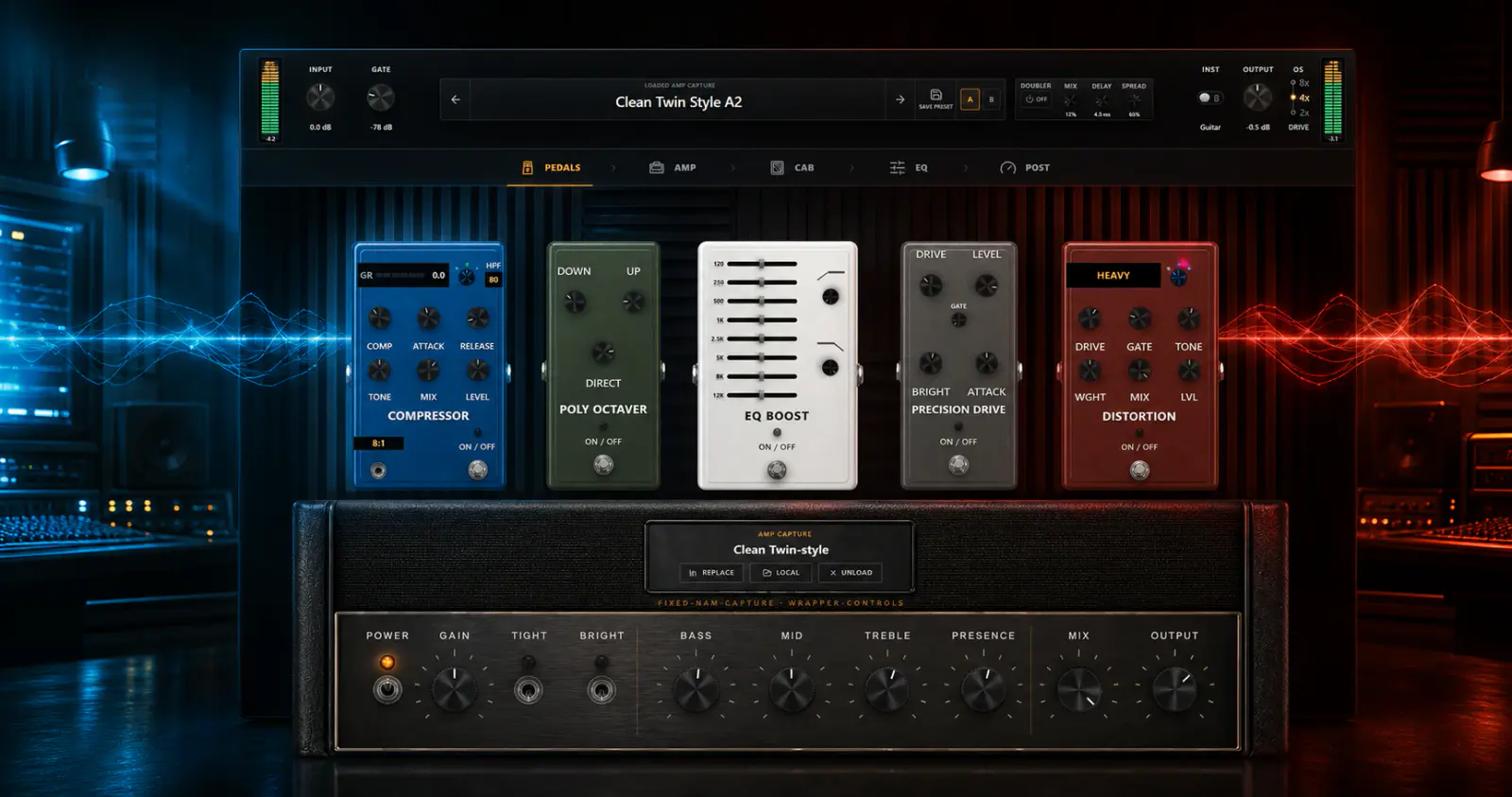
There is no magic preset that works for every guitar, pickup, tuning, interface, and mix. There is, however, a reliable order for making decisions. Start with a healthy DI, choose the capture and cabinet that already point in the right direction, control what hits the amp, and use post effects only to finish the sound.
This guide uses two real OpenStudio v19 user presets as examples: Bestest clean! and good highgain riff. Their values were read from the saved rack presets and rounded for readability. The referenced third-party NAM captures and IR are not bundled with OpenStudio, so treat these settings as recipes and use models you own or can download under their creators' licenses.
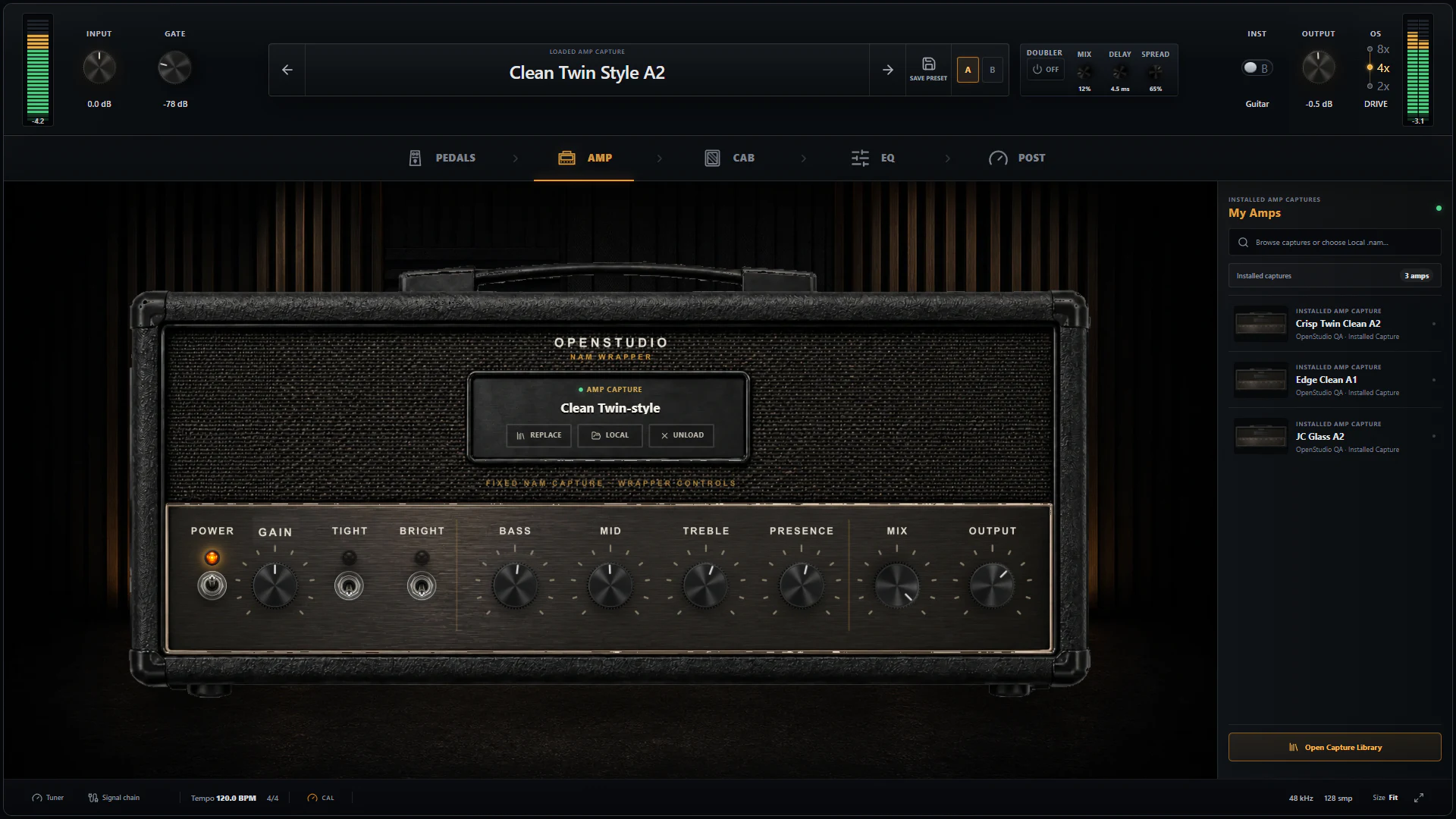
The Amp page is the centre of the tone, but the input, pedals, cabinet, Cabinet Space, EQ, and post effects decide how that capture behaves in the song.
The five-minute starting workflow
-
Record a clean DI. Put OpenStudio NAM Rack on the guitar track, select the correct hardware input, arm or monitor the track, and keep the recorded source dry. You can change the complete tone later without replaying the part.
-
Tune before effects. Open the rack tuner and check the note, cents, and tracking confidence. The tuner observes the input; it does not enter the audible chain.
-
Set the interface once. Avoid clipping at the interface and avoid changing its gain every time a preset changes. Use CAL when a capture supplies reliable reference metadata. Calibration represents the playback hardware and capture reference; the rack's Input knob is a creative trim.
-
Choose the right kind of capture. An amp-only capture needs a cabinet IR. A full-rig capture already contains its cabinet, so OpenStudio bypasses the external cabinet automatically. A capture that is already close will beat heroic EQ on the wrong model.
-
Start with fewer stages. Turn off Compressor, Octaver, PRE EQ, Precision Drive, Distortion, Graphic EQ, Modulator, Delay, Reverb, Room, and Doubler. Make the capture and cabinet work first, then enable one stage at a time.
-
Level-match every decision. Use A/B slots and adjust stage/output level so louder does not automatically win. Compare in the song, not only while playing alone.
Know what changes before and after the amp
The Pedals page is not just a row of colours. Its position before the NAM capture is the reason those controls feel different from post EQ.
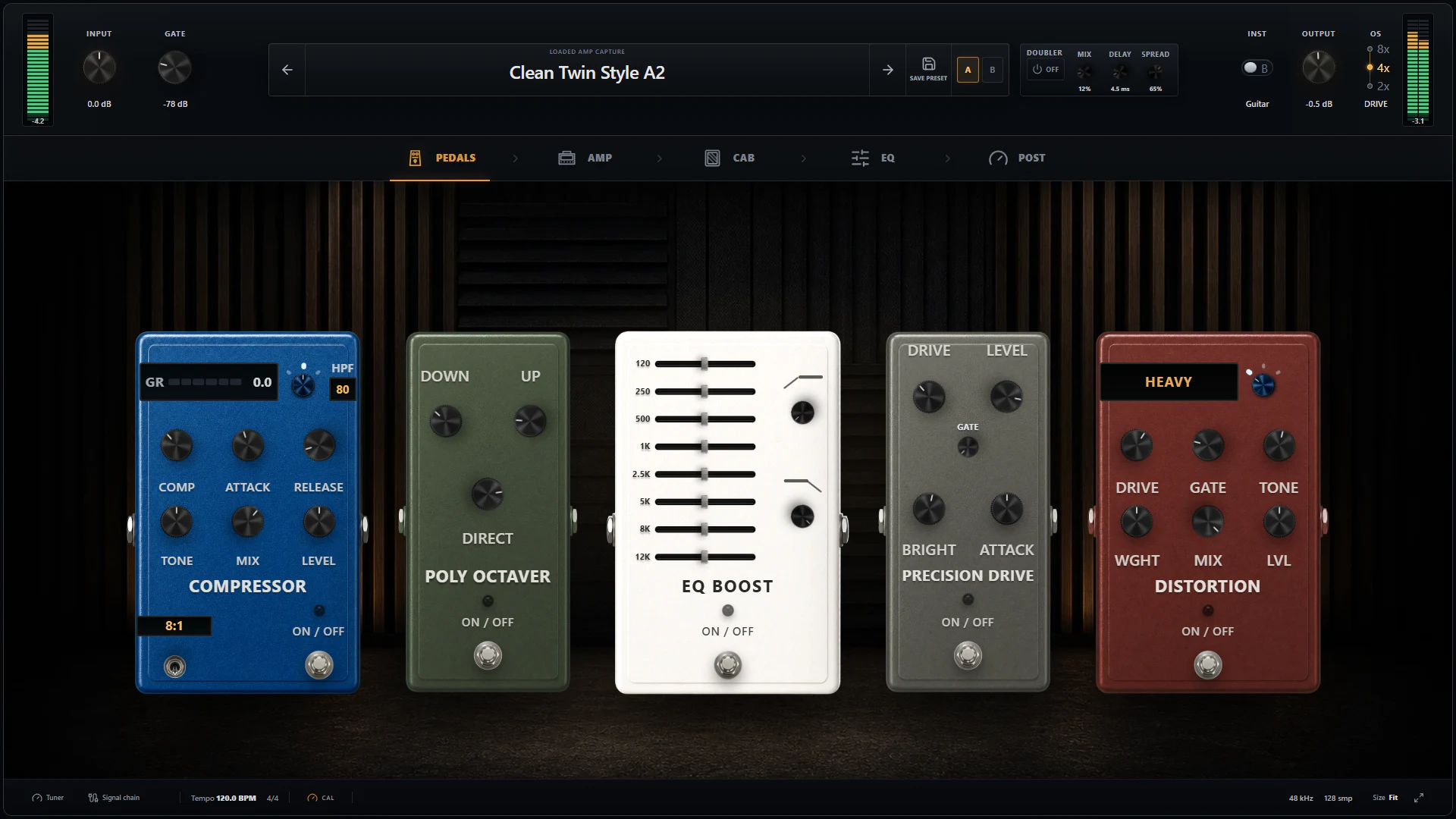
Everything on this page changes what reaches the capture. PRE EQ and Precision Drive therefore change the distortion response, not merely the final frequency balance.
-
Gate controls silence and note endings before gain raises the noise floor. Raise Threshold until pauses become clean, then back it down if sustains or pick detail disappear. Release controls whether the gate closes naturally or snaps shut.
-
Compressor evens out clean playing and can add sustain. Mix allows parallel compression; detector HPF stops low strings from making the entire signal pump.
-
Stereo Poly Octaver blends octave-down and octave-up voices while supporting chords and stereo material. Keep Direct high for a recognisable guitar attack, then add octave voices to taste.
-
PRE EQ changes the signal before the gain stages. Cutting low frequencies here can stop palm mutes from overwhelming a high-gain capture. Boosting upper mids here can make the capture distort more aggressively around the pick attack.
-
Precision Drive is the rack's tightening overdrive. Low Drive with higher Volume is the classic boost approach; more Drive adds its own clipping. Bright and Attack decide whether it feels sharper, leaner, or fuller.
-
Distortion is a separate gain voice. Heavy, Extreme, and Crunch modes, plus Weight, Tone, Mix, Gate, and Level, let it become the main dirt or a layer around the capture.
-
Pedal NAM loads an optional captured pedal after the native pedals and before the amp capture. Use it when the character of a specific captured drive matters more than a flexible native effect.
After the capture, Cabinet and Cabinet Space set the speaker response, focus, early room, and width. Graphic EQ, Modulator, Stereo Delay, and Reverb then finish the already-amplified tone and can be reordered.
Tone example 1: “Bestest clean!”
This preset is not a dry, clinical clean. It is a large stereo clean built from a Fender Twin-style amp capture, a Dumble cabinet IR, subtle upper-air EQ, a driven front end, early cabinet room, doubling, and a long Studio reverb.
| Stage | Enabled setting | What it does here |
|---|---|---|
| Input | 0.0 dB | Leaves the saved interface/capture calibration relationship unchanged. |
| Gate | −92.6 dB, 80 ms Release | A very gentle safety net. It should leave clean sustains and finger noise mostly untouched. |
| Compressor / Octaver / PRE EQ / Distortion | Off | The preset gets its feel and size elsewhere instead of stacking every device. |
| Precision Drive | On; Drive 64.8%, Bright 55%, Attack 33.6%, Gate 0%, Volume +5.2 dB | Adds front-end harmonics and pushes the capture. The moderate Bright and softer Attack keep it from becoming a thin metal boost. |
| Amp capture | Fender TwinVerb Vibrato Bright | Provides the clean American-style foundation. This is a third-party capture, not a bundled model. |
| Amp wrapper | Gain +7.5 dB; Bass +4.3 dB; Mid −1.0 dB; Treble +1.6 dB; Presence 0 dB; Mix 100%; Output −1.4 dB | Drives the clean capture into a more responsive, polished edge while keeping full wet tone. Bass adds body; the small mid dip and treble lift open the sound. |
| Cabinet IR | Dumble IR | Changes the speaker/microphone fingerprint. The IR is at least as important as the amp name for the final clean colour. |
| Cabinet shaping | Level +12 dB; HPF 80 Hz; LPF 8.5 kHz; Edge 50%; Damp 6.6%; Blend 50%; Low Bloom 11.6%; Phase inverted | Removes sub rumble and excess top fizz while restoring level. Phase inversion does not change a lone track's timbre by itself; it matters when this tone is layered with another path. |
| Cabinet Room | On; Amount 51.8%, Width 79.8% | Supplies a broad early reflection before the main reverb, making the cab feel less close-miked. |
| Doubler | On; Mix 78.6%, Delay 4.0 ms, Spread 100% | Creates obvious stereo size with a very short offset. Check mono and reduce Mix if the centre becomes weak. |
| Graphic EQ | On; 250 Hz −1.5 dB, 8 kHz +3.0 dB, 16 kHz +1.5 dB; other bands flat | Clears a little low-mid cloud and adds gloss after the cabinet. |
| Reverb | Studio; Mix 39.8%, Decay 5.66 s, Pre Delay 207 ms, Low Cut 100 Hz, Tone 30.4%, Air 43.2%, Pad off | The long pre-delay keeps the picked note forward before a large tail blooms. Low Cut keeps that tail away from bass; Air adds an elevated high texture. |
| Output | +4.9 dB | Restores the final preset level. Re-match this to neighbouring tones before judging it. |
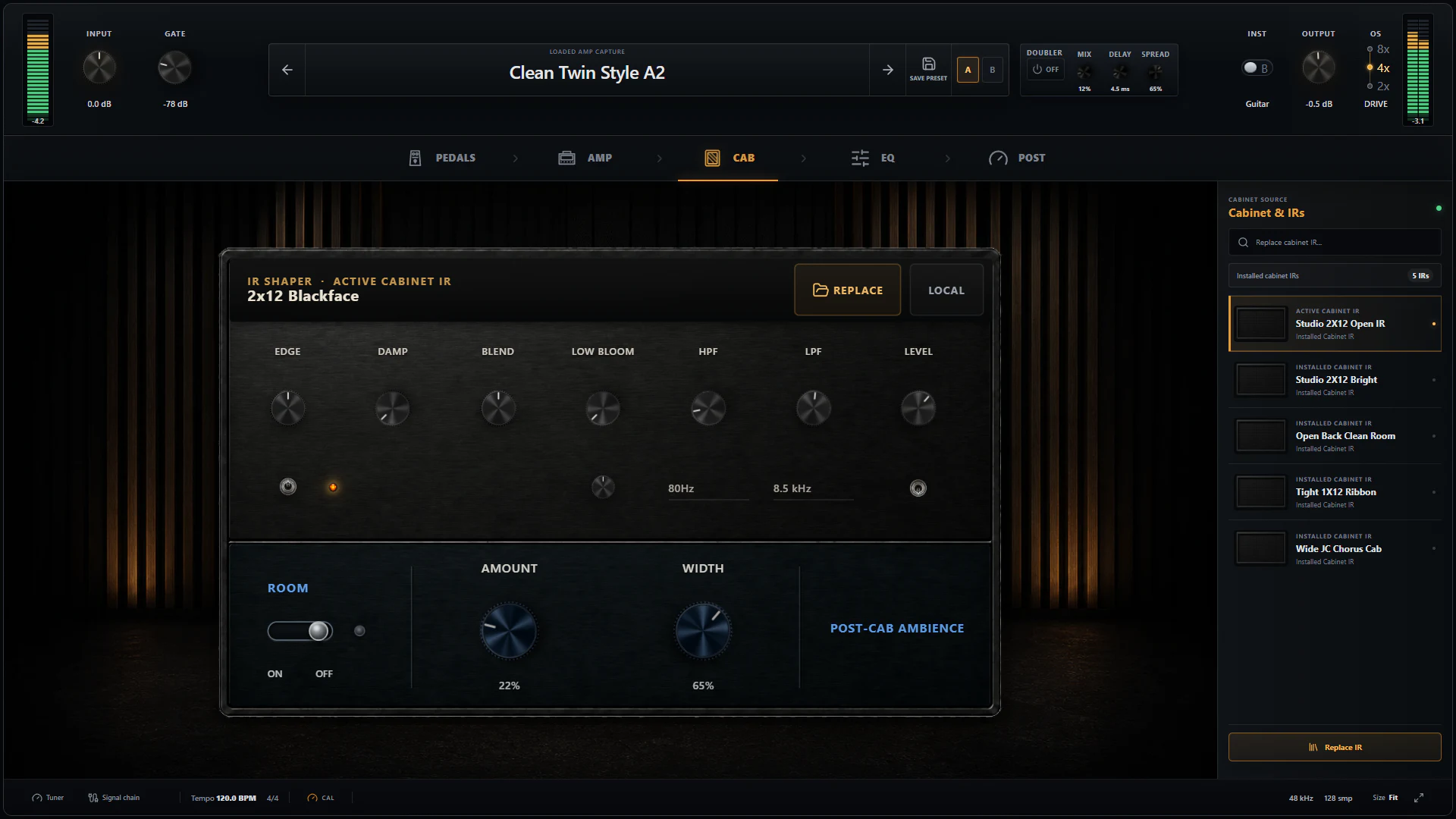
For this kind of clean, the cabinet, early Room, Doubler, and long reverb are doing as much creative work as the amp capture.
How to adapt this clean recipe
- For a tighter funk clean, turn off Doubler, reduce Room below 20%, shorten Reverb Decay, and bring Mix below 20%.
- For humbuckers, try less Amp Gain and Bass before reaching for post EQ.
- For single coils, keep the long pre-delay but reduce Air if pick noise becomes brittle.
- If the clean breaks up too early, reduce Precision Drive Volume or Amp Gain. Do not compensate only with Output; Output changes level after the character has already been created.
- If it disappears in mono, reduce Doubler Mix first. The phase switch is not a “better tone” switch—choose its position while listening against other layered tracks.
Tone example 2: “good highgain riff”
This preset takes the opposite approach: one full-rig capture already containing the familiar 5150, Maxon, Mesa oversized cabinet, and SM57 chain; no separate cabinet; no added Precision Drive or Distortion; strong pre-capture EQ; and only a little Cabinet Room after the capture.
| Stage | Enabled setting | What it does here |
|---|---|---|
| Input | 0.0 dB | Preserves the input reference used while the preset was built. |
| Gate | −59.8 dB, 80 ms Release | Much firmer than the clean preset, giving palm-muted stops a defined edge without using the pedal gates. |
| Compressor / Octaver | Off | Keeps pick transients direct and avoids extra low octave energy before high gain. |
| PRE EQ | On; 120 Hz +5.7 dB, 250 Hz +1.0 dB, 500 Hz −1.5 dB, 1 kHz flat, 2.5 kHz +3.3 dB, 5 kHz flat, 8 kHz +1.8 dB, 12 kHz +7.0 dB; HPF/LPF off | A capture-specific curve: low weight at 120 Hz, less boxiness at 500 Hz, and more pick definition from 2.5 kHz upward. The large 12 kHz boost works only because the full rig's cabinet response already limits the extreme top; copy it cautiously. |
| Precision Drive / Distortion / Pedal NAM | Off / Off / empty | Avoids adding another standalone drive because the selected full-rig capture already includes a Maxon in the captured chain. |
| Full-rig capture | Peavey 5150 + Maxon + Mesa OS + SM57 | Supplies amp, boost, speaker, and microphone as one captured response. This is a third-party capture, not a bundled model. |
| Amp wrapper | Gain −7.4 dB; Tight Boost on; Bass +5.1 dB; Mid −3.1 dB; Treble +2.6 dB; Presence 0 dB; Mix 100%; Output −3.2 dB | The lower input gain stops the full rig from turning to blur. Tight adds extra control before the capture; the broad tone curve adds weight and attack around the capture's existing voice. |
| External cabinet | Off automatically | The full-rig capture already contains its Mesa/SM57 cabinet response, so a second IR would double-filter it. |
| Cabinet Room | On; Amount 22%, Width 65% | Adds enough early space to avoid a flat direct sound while keeping the riff centred and immediate. |
| Doubler / Graphic EQ / Modulator / Delay / Reverb | Off | Keeps the rhythm tone dry, focused, and easy to double-track. Stored values behind bypassed effects are not part of the audible preset. |
| Output | 0.0 dB | Leaves final level neutral after the amp wrapper's output reduction. |
Why the high-gain recipe works
The preset uses gain reduction and frequency shaping before the capture instead of asking more distortion to create heaviness. Its standalone Precision Drive is off, yet the source capture already contains a Maxon and the rack Tight switch is on. That is why reading only the visible pedal row would miss part of the story.
The large PRE EQ boosts are specific to this capture and guitar. Start flat on another model. If palm mutes bloom too much, reduce 120 Hz before raising the gate. If the tone is fizzy, reduce 8 and 12 kHz before cutting all treble. If it disappears beside bass and drums, restore some Mid instead of adding more gain.
For wide rhythm guitars, record the part twice and hard-pan two real performances. Leave Doubler off on the main high-gain tracks; a short artificial double can be useful for a sketch, but it cannot reproduce the timing and articulation differences of two performances.
What Rabea, Nolly, and Misha keep returning to
Three experienced modern players/producers arrive at a similar conclusion from different directions: tone is a chain of decisions, not one amp setting.
In D'Addario's Sound Advice session with Rabea Massaad, Rabea breaks tone into the pick, fingers, pedals, amp, and guitar. That is a useful order of responsibility. If the pick attack is too sharp or the fretting hand is noisy, a rack can reshape it but cannot make it irrelevant. Record yourself, listen back, and change the source before building a larger corrective chain.
In a detailed Guitar World interview with Adam “Nolly” Getgood, Nolly stresses the player's technique, pick and string choices, controlled low end before distortion, and enough midrange to keep a high-gain sound present. In NAM Rack terms: use PRE EQ or a low-drive Precision Drive to stop excessive bass from hitting the capture, and do not assume a dramatic mid scoop is automatically heavier.
In Sweetwater's workshop summary, Misha Mansoor describes a 5150-style amp, boost, Vintage 30 cabinet, and SM57 as a familiar clear high-gain route. He explains that the boost removes low frequencies before the amp so low tunings and palm mutes stay controlled. In a separate modern-metal tone walkthrough, he starts amp EQ around noon, uses conservative gain, keeps an overdrive's Drive low and Level high, uses gates for precise stops, and damps unused strings behind the nut.
None of those ideas require copying an artist's gear. They translate directly into decisions available in NAM Rack: clean source, sensible input, suitable capture, controlled pre-gain bass, enough midrange, deliberate gate, and cabinet choice before post-processing.
Nine tricks that save time
-
Loop the actual riff. A sustained chord can hide problems that palm mutes expose. Dial a high-gain tone with the part it must play.
-
Start amp EQ near neutral. Move one control at a time and return to A/B. The capture already contains a strong tone; large wrapper moves should have a clear purpose.
-
Use less gain than the solo button suggests. Double-tracking and bass make a restrained guitar sound larger. Too much gain reduces pick contrast and makes editing feel less tight.
-
Remove low end before gain, weight it after. PRE EQ, Precision Drive Attack, and Tight control what distorts. Amp Bass, cabinet response, post EQ, and the bass guitar can provide weight later.
-
Choose the cabinet before polishing EQ. With an amp-only capture, try several IRs before building a complicated curve. A different speaker/microphone response can solve the whole problem.
-
Set the gate while notes decay. Raise Threshold during the noisy pause, then sustain a note and lower it until the ending returns. Adjust Release after Threshold.
-
Gain-match A/B. Save the unedited tone in A, make changes in B, and match output. If the improvement disappears at equal loudness, it was probably only louder.
-
Check stereo tricks in mono. Room and Doubler can make a clean inspiring, but the centre still has to survive phone speakers, clubs, and mono buses.
-
Save stages, not only victories. Keep versions such as
Riff 01 capture,Riff 02 pre-EQ, andRiff 03 mix-ready. The preset library's notes, tags, folders, A/B comparison, and export make experiments recoverable.
A compact checklist before you save
- The interface input is clean and not clipping.
- The tuner is stable and the guitar is intonated for the part.
- Calibration and creative Input trim have not been confused.
- The capture type is correct: amp-only with an IR, or full-rig without a second cabinet.
- Bypassed stages are truly unnecessary.
- The gate preserves the notes you want.
- A/B is level-matched.
- The tone works with drums and bass, not only in solo.
- Stereo tones have been checked in mono.
- The preset has useful tags/notes, and third-party capture/IR licenses are respected before sharing.
OpenStudio includes the NAM Rack engine in the normal app download. Bring a local .nam capture and WAV IR, or optionally connect a TONE3000 account, then use the recipes above as starting points rather than commandments.
Download OpenStudio and build the tone around the guitar, hands, and song in front of you.