Updated 28 August 2026 for the current NAM Rack interface and effects engine v19.
OpenStudio's NAM Rack is built for the full guitar workflow. Plug in, tune, choose a capture, shape the signal before and after it, record, and reopen the project with the same tone intact. It is not a model loader sitting beside the DAW: the rack belongs to OpenStudio's audio engine, automation, project state, and render path.
There is no paid NAM Rack tier or separate NAM download. The rack engine ships inside the normal OpenStudio installer. Local .nam captures and cabinet IRs work without an account; a TONE3000 account is needed only for connected TONE3000 delivery. Third-party models and IRs remain subject to their creators' licenses.
Explore the complete workflow in the NAM Rack feature chapter, read the practical tone-building guide, or download OpenStudio.
The rack was rebuilt around the way guitarists work
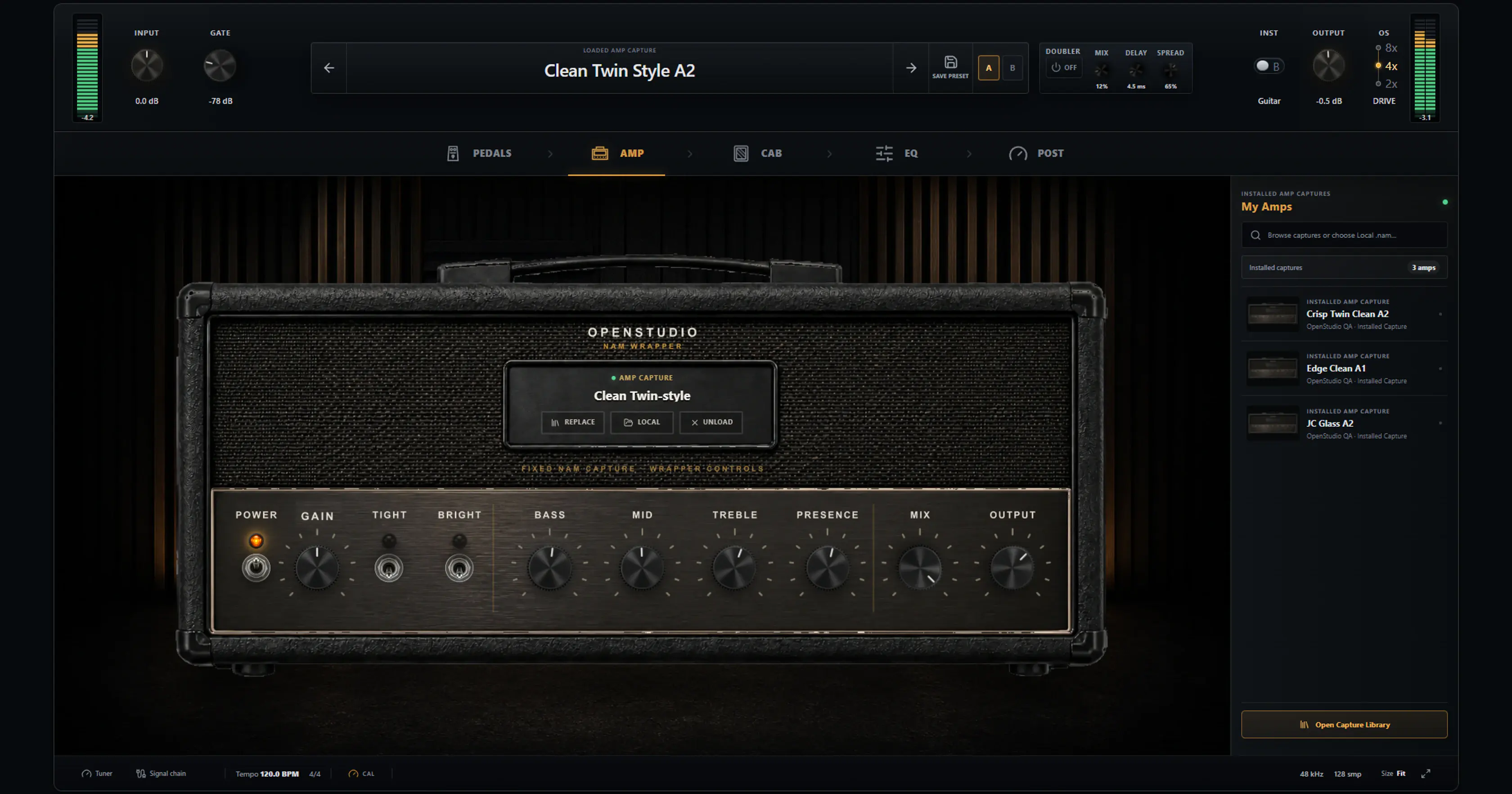
The current Rack view is divided into Pedals, Amp, Cab, EQ, and Post pages. Input and output meters, gate, presets, A/B comparison, instrument profile, oversampling, tuner, and the compact signal-chain drawer remain available around those pages. The result is a rack that can show real hardware-style controls without hiding the session-level information that matters.
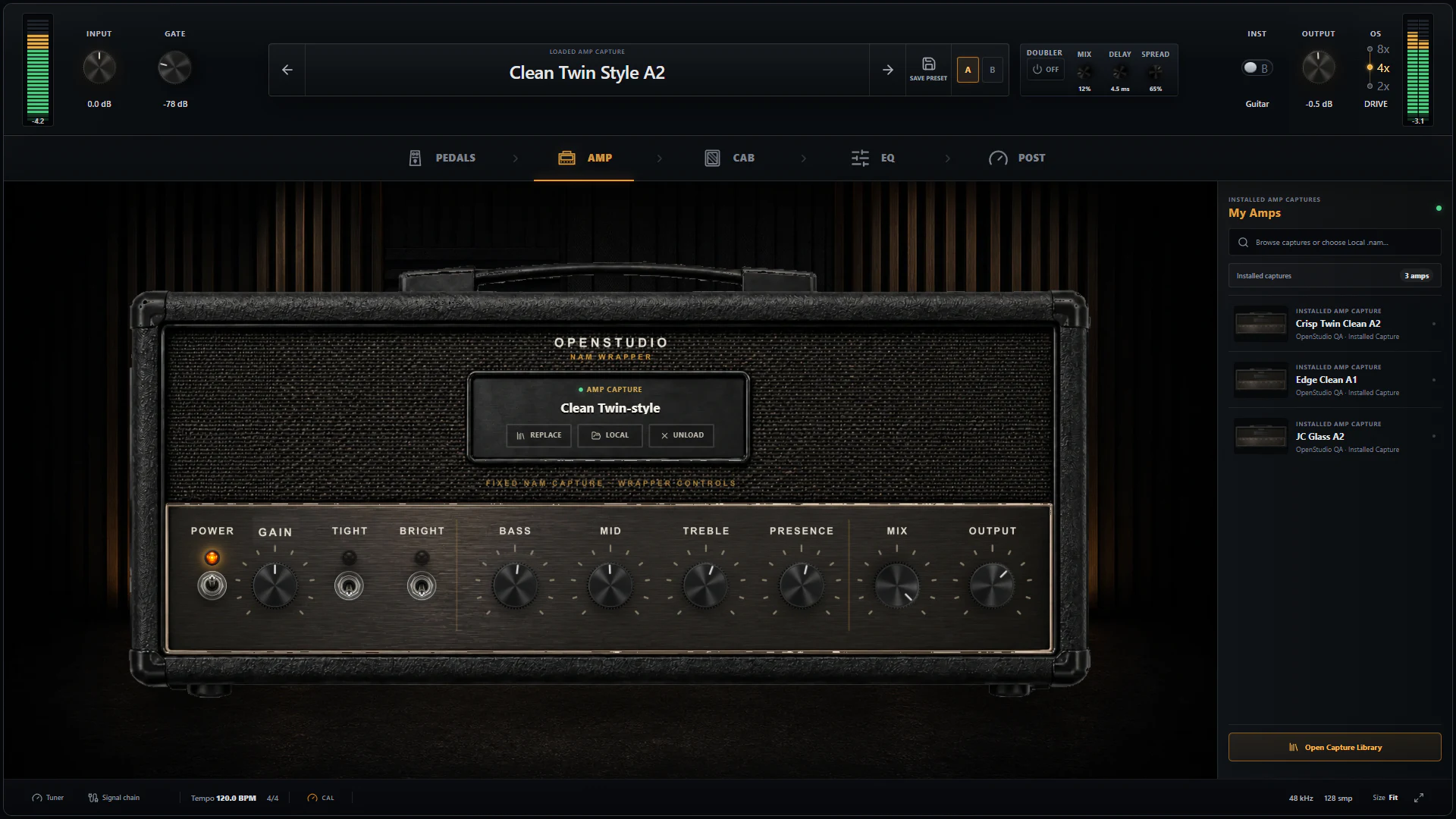
The Amp page keeps the current capture, wrapper controls, installed captures, A/B slots, meters, and preset actions in one view.
The amp controls sit around the selected capture rather than pretending to change the original hardware. Gain changes how the capture is driven; Bass, Mid, Treble, and Presence shape the result; Tight and Bright offer focused voicing changes; Mix and Output make parallel use and gain matching explicit.
The current signal path is explicit
Effects engine v19 uses this audible route:
Input (the tuner observes here)
  -> input trim
  -> gate
  -> compressor
  -> Stereo Poly Octaver
  -> PRE EQ
  -> Precision Drive
  -> Distortion
  -> optional Pedal NAM capture
  -> A1/A2 amp or full-rig NAM capture
  -> cabinet IR and cabinet shaping when the capture is amp-only
  -> Cabinet Space: Room and optional Doubler
  -> reorderable Graphic EQ, Modulator, Stereo Delay, and Reverb
  -> output trim and meters
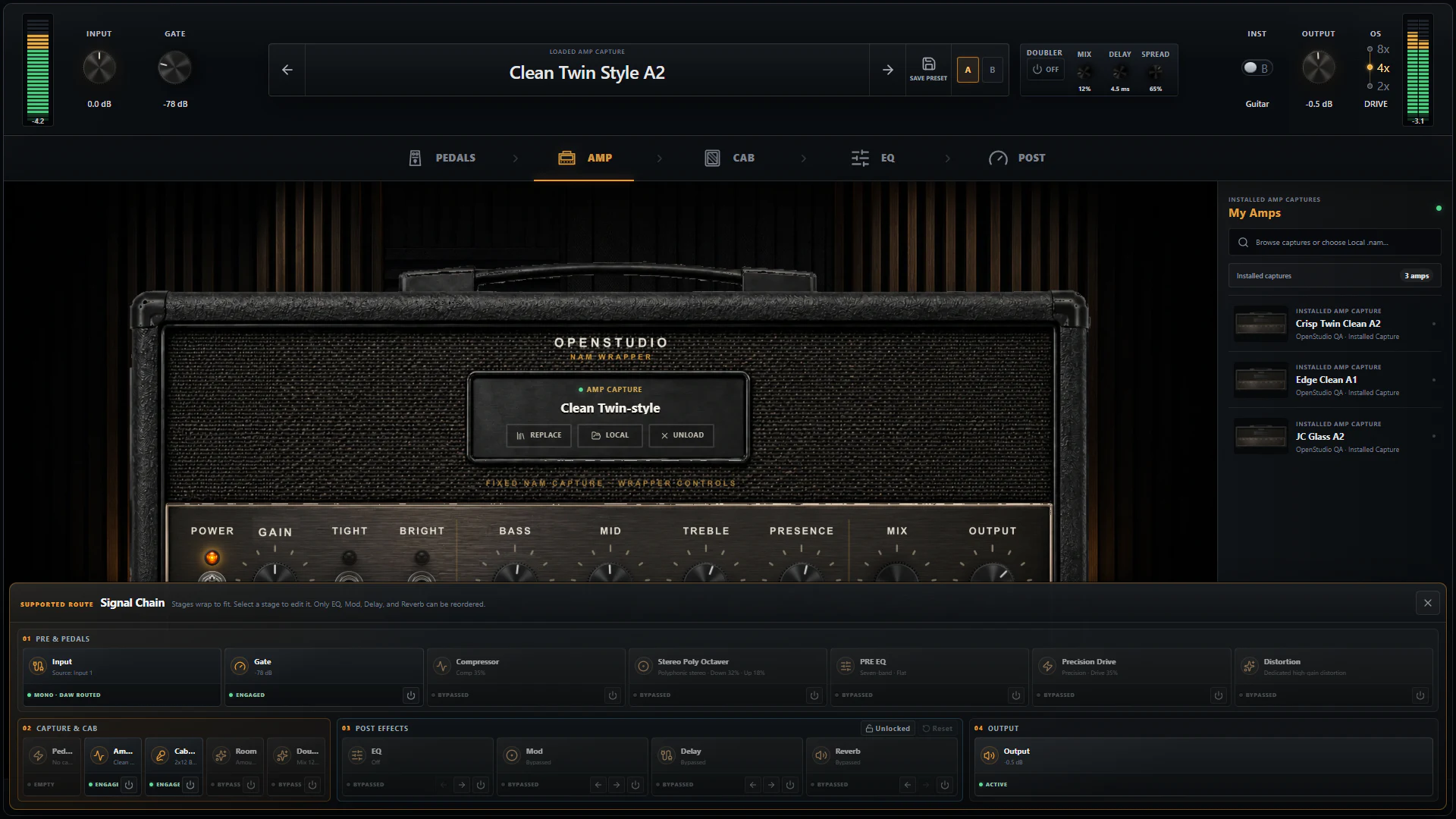
The signal-chain drawer reports the route that is actually running, including bypass state, Pedal NAM, Cabinet Space, DAW routing, and the reorderable post section.
The old dedicated pre-capture Tape Echo was retired. Tape remains available as a mode in the post-cab Stereo Delay, where repeats do not repeatedly drive the amp capture. The old monophonic octaver was also replaced by a Stereo Poly Octaver that keeps left and right processing independent. Old Tape Echo state is pruned during preset migration instead of being silently mapped onto a different effect.
Five focused devices before the capture
The Pedals page now shows Compressor, Stereo Poly Octaver, PRE EQ, Precision Drive, and Distortion. The gate remains in the rack header because it is input conditioning rather than a pedal slot.
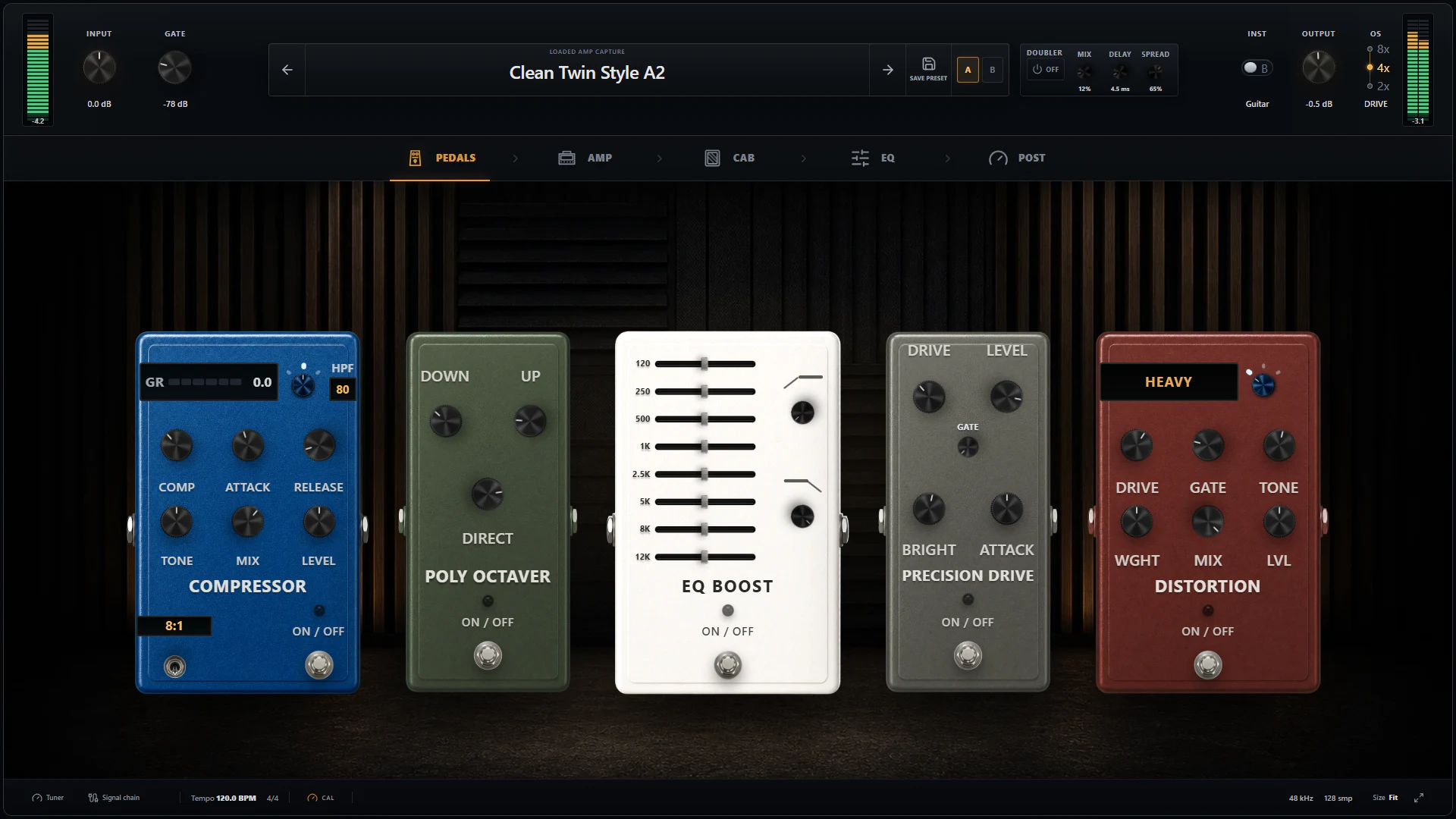
Five devices cover dynamics, polyphonic octave voices, pre-gain EQ, tightening, and dedicated distortion before the capture.
-
Gate — Threshold and Release control the first audible stage. The threshold can be set low for natural decays or raised for tight stops; Release decides whether the close feels smooth or abrupt.
-
Compressor — Comp, Attack, Release, Tone, Mix, Level, Intensity, and detector HPF cover gentle clean levelling through assertive parallel compression. Its detector high-pass filter prevents low strings from dominating the gain-reduction decision.
-
Stereo Poly Octaver — Down, Up, and Direct blend octave voices with the dry signal. Unlike the retired mono design, it can follow polyphonic material and preserves stereo routing.
-
PRE EQ — Eight bands from 120 Hz to 12 kHz, plus high- and low-pass filters, shape what reaches the gain stages. A low cut here tightens distortion differently from removing bass after the amp; an upper-mid boost here changes pick attack and the way the capture saturates.
-
Precision Drive — Drive, Bright, Attack, Gate, and Volume make this the focused tightening stage. It can be used as a low-drive, high-level boost or as a more audible overdrive.
-
Distortion — Heavy, Extreme, and Crunch modes add a separate gain voice with Drive, Weight, Tone, Gate, Mix, and Level. It can be the main distortion or be stacked with Precision Drive and a NAM capture.
An optional Pedal NAM slot follows these native devices. It accepts a pedal capture separately from the amp slot, so a captured drive or preamp can become part of the saved rack without being confused with the main amp model.
A1 and A2 captures, with amp-only and full-rig behavior
The amp slot loads local A1 and A2 NAM captures. A capture may represent an amp, a pedal, or a complete rig. A2 is the newer NAM architecture, but the rack does not assume newer means better for every song: the right capture is the one that responds correctly to the guitar, input level, and part.
Neural Amp Modeler provides the open model format, while NeuralAmpModelerCore provides the inference engine compiled into OpenStudio. Model loading and preparation happen away from the audio callback, then the prepared resource is moved into use safely.
For an amp-only capture, the Cab page loads an external impulse response and exposes Edge, Damp, Blend, Low Bloom, HPF, LPF, Level, Pan, and Phase. For a full-rig capture, OpenStudio bypasses the separate cabinet rather than stacking a second speaker response. The selected external IR is retained so it returns when an amp-only capture is loaded later.
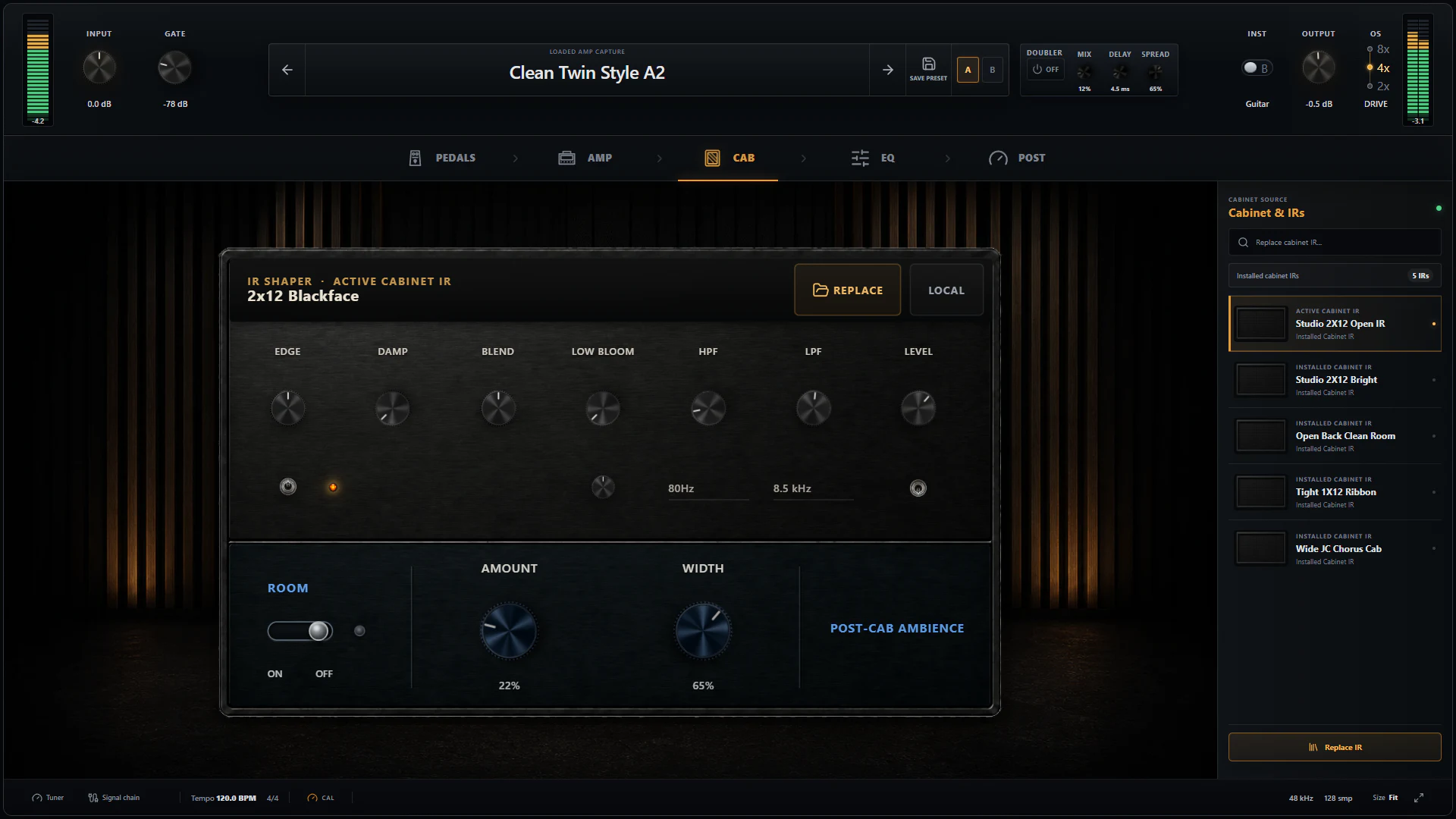
The redesigned Cab page combines the active IR, installed IR library, cabinet shaping, and Cabinet Space Room controls.
Cabinet Space adds width after the speaker stage
Cabinet Space is separate from the convolution IR. Room adds early ambience with Amount and Width, while Doubler adds a short, spread delay with Mix, Delay, and Spread. Because this stage follows the cabinet decision, it also remains useful when the loaded capture is a full rig.
The Doubler is routing-aware: it needs a stereo path to create width and pauses when the effective route is mono. Its side signal is designed to remain useful when the mix is checked in mono, but a guitarist should still audition important tones in both stereo and mono.
Post-cab correction and ambience
The dedicated EQ page contains nine fixed bands at 65, 125, 250, 500 Hz, 1, 2, 4, 8, and 16 kHz, plus HPF, LPF, and output Level. It is a fast correction stage for fitting a completed rig into a mix.
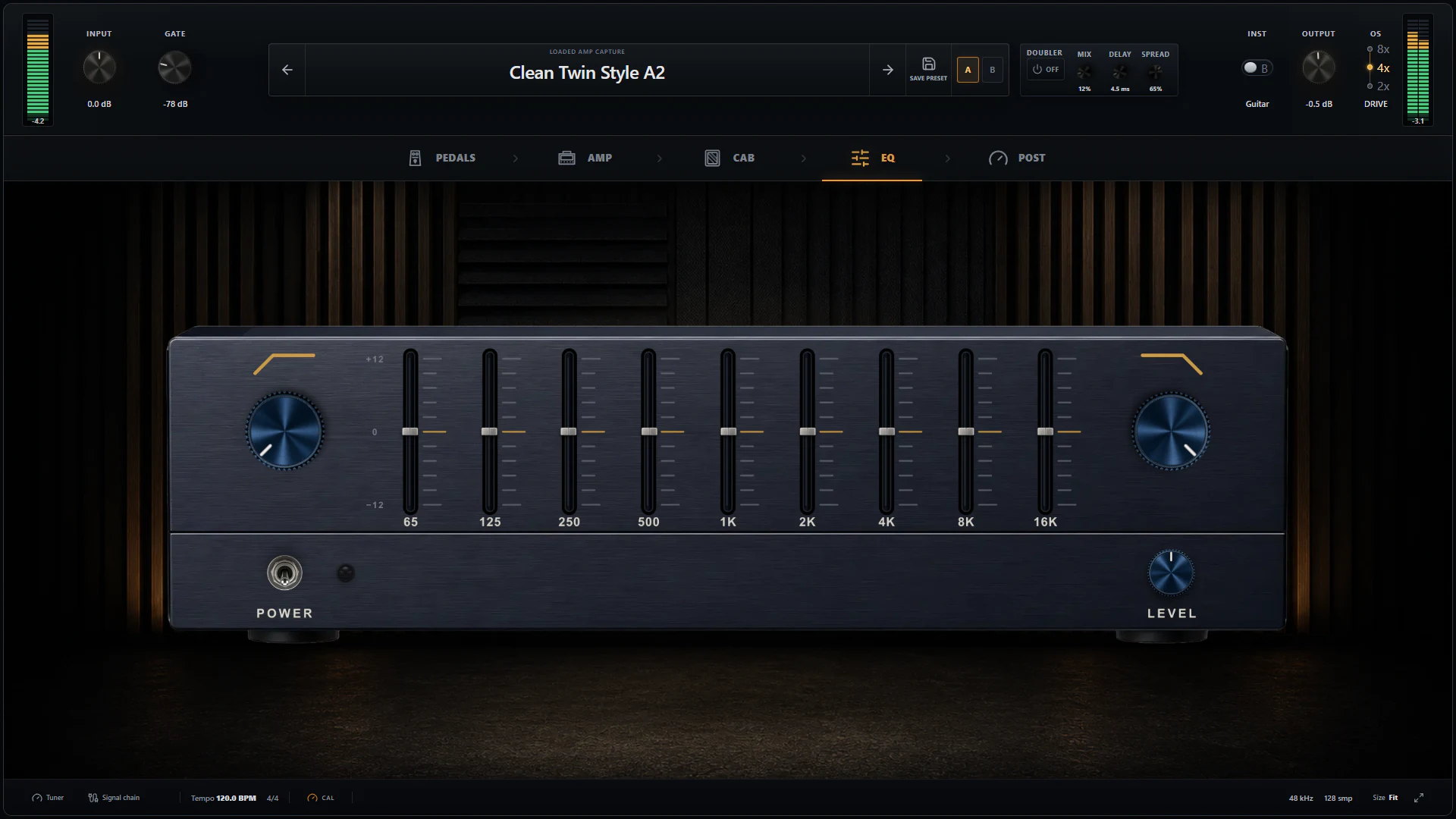
The Graphic EQ makes broad, repeatable post-cab moves without turning the rack into a surgical mixing plug-in.
Graphic EQ, Modulator, Stereo Delay, and Reverb are the four reorderable post effects. Their default order is EQ → Modulator → Delay → Reverb, but the signal-chain drawer can move them when a different interaction is wanted.
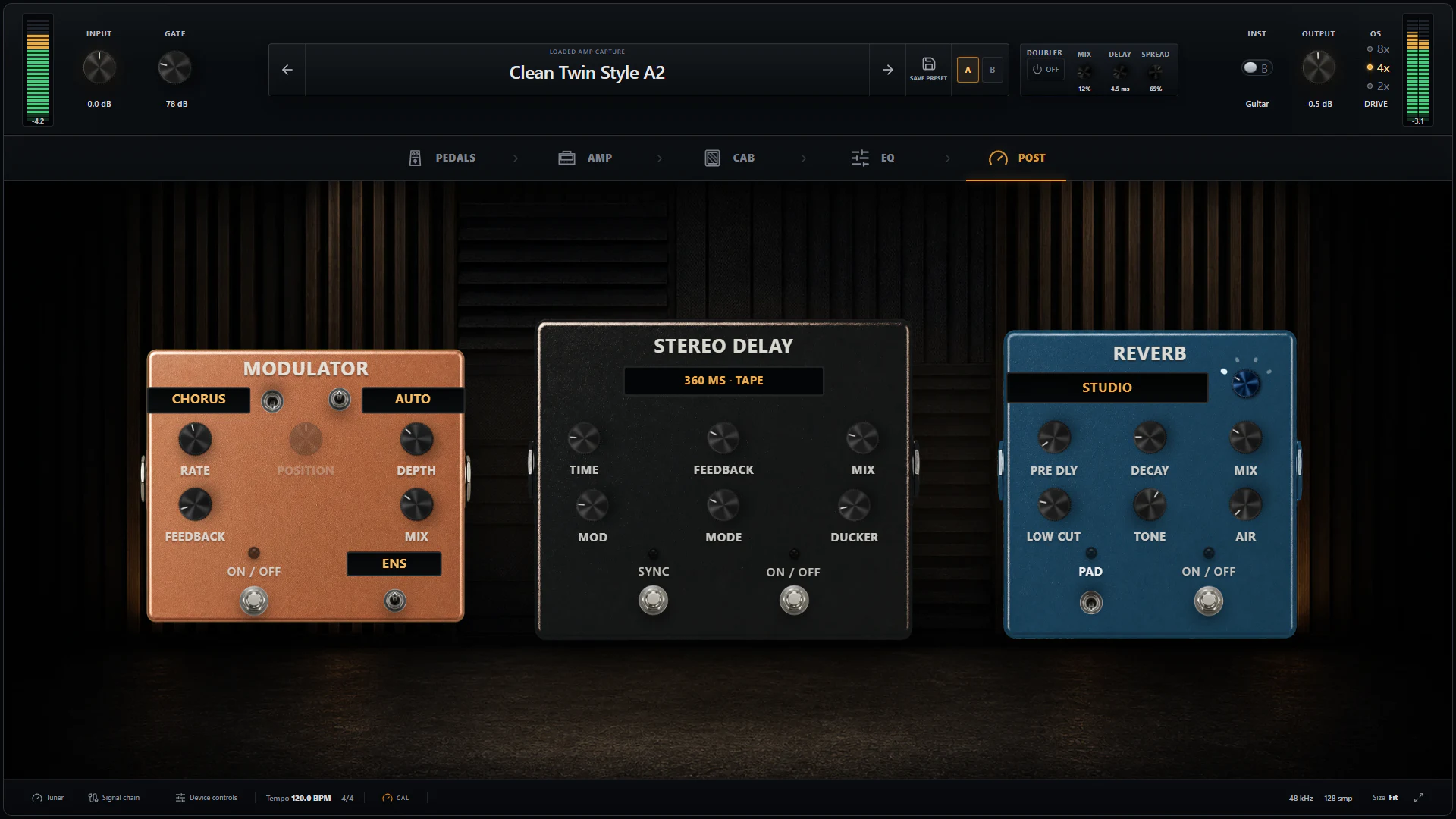
The Post page keeps the three pedal-style time and modulation devices visible; Graphic EQ has its own page and still participates in post-effect ordering.
-
Modulator switches between Chorus and Flanger, with Pedal or Auto movement, Clean or Ensemble character, Rate, Position, Depth, Feedback, and Mix.
-
Stereo Delay provides Digital, Tape, Analog, Multi, and Dual modes. Time, Feedback, Mix, Mod, Ducker, Ping Pong, and Tempo Sync cover slapback through wide rhythmic repeats.
-
Reverb provides Studio, Plate, Hall, and Room voices with Mix, Decay, Pre Delay, Low Cut, Tone, Air, and Pad. Pre-delay can leave the pick attack clear before the reverb blooms; Low Cut prevents the ambience from taking over the bass range.
Tune and calibrate before chasing knobs
The tuner observes the raw matched input route without entering the audible signal. It shows note, cents, frequency, input level, tracking confidence, and the 440 Hz reference, and it holds a stable reading as a note decays.
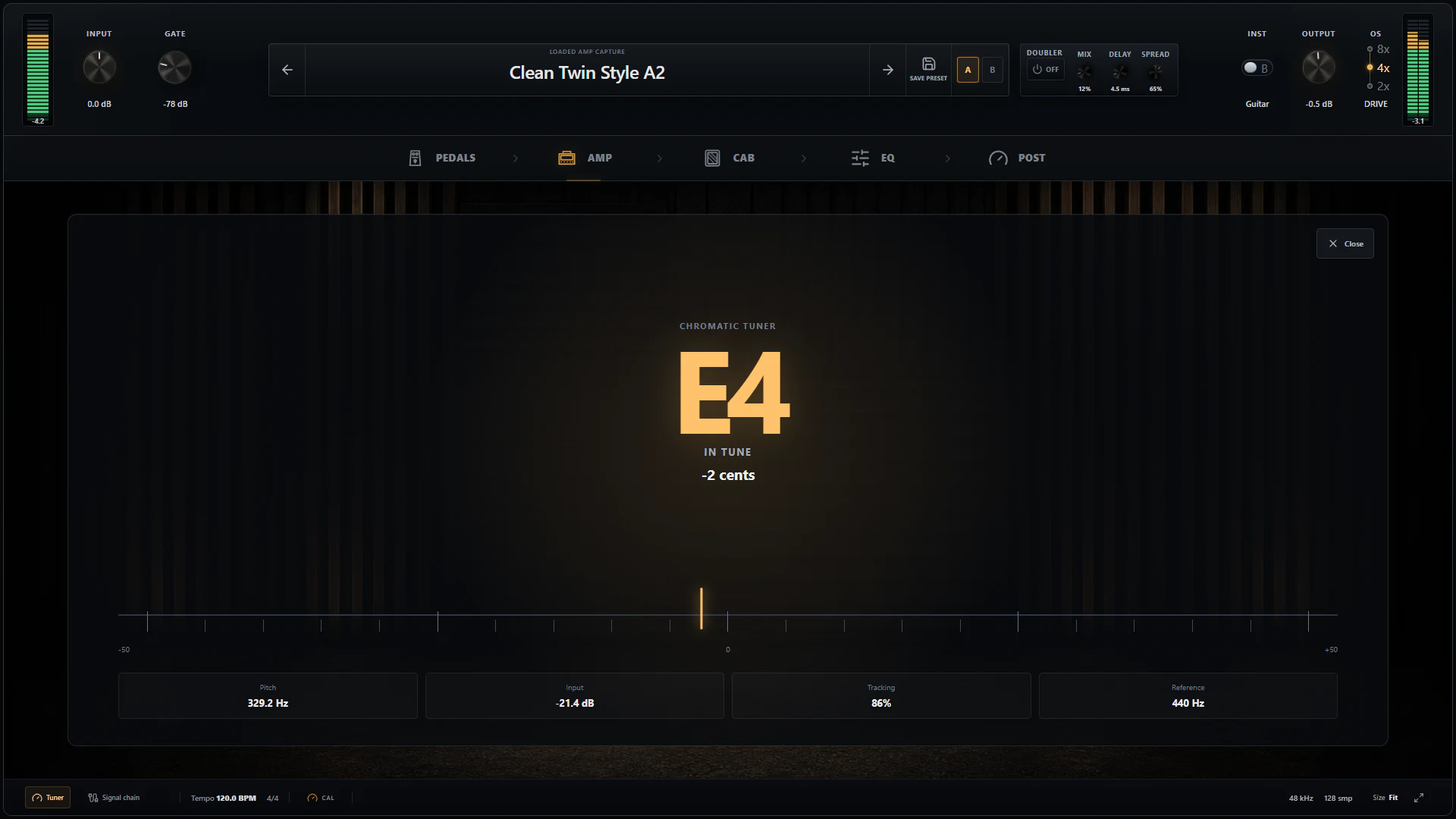
The tuner reads the input before effects, so opening it does not color or delay the guitar signal.
Calibration is separate from creative Input and Output trims. When a capture includes useful input/output reference metadata, Model calibration aligns that reference with the interface setting. Off ignores capture calibration, while Override lets the user supply a deliberate reference. This matters because a level-sensitive neural capture can feel cleaner, softer, or more compressed depending on how hard it is driven.
Browse deliberately, then commit
The Capture Library combines local installed models with optional connected TONE3000 views. A connected account can browse Latest, Trending, and Downloaded items, inspect creator and license metadata, and install a chosen capture from TONE3000's official delivery path. Installed and Favorites remain useful local views.
Audition is temporary: Stop Audition restores the previous source, while Use Capture or Use IR commits the choice. OpenStudio does not bulk-download, mirror, proxy, or re-host creator libraries. It keeps source and license metadata visible so a tone can be useful without obscuring where its assets came from.
Presets now remember the complete creative rack
A user preset can store the complete creative signal chain, including amp and optional pedal capture identity, the external IR choice, enabled states, effect values, Cabinet Space, and post-effect order. Search, favorites, recent items, folders, tags, notes, Save As, import/export, duplicate, rename, and delete make the library useful beyond a single session.
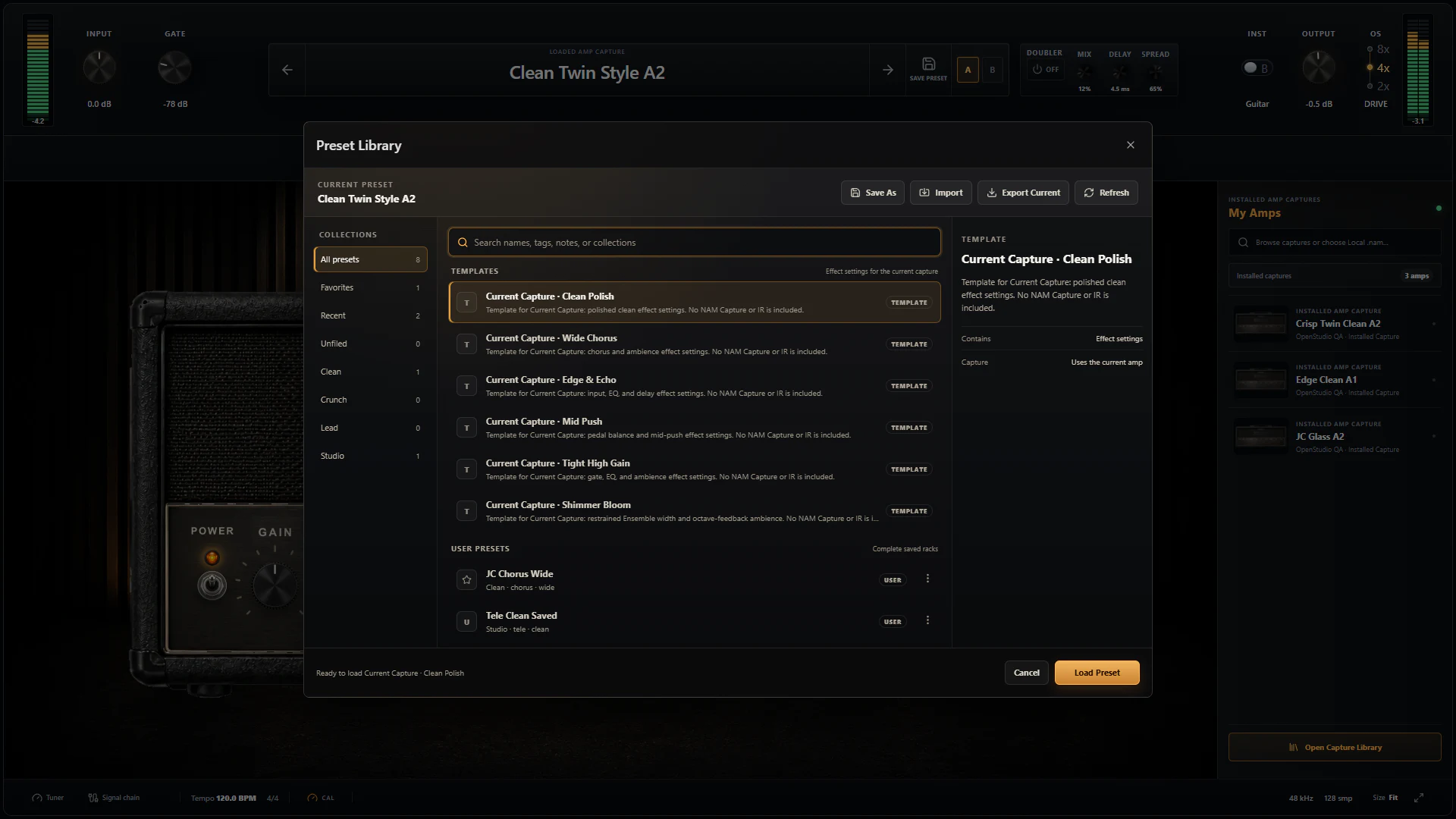
Factory entries are capture-agnostic starting points; user presets are complete saved racks.
Factory templates such as Current Capture · Clean Polish, Wide Chorus, Edge & Echo, Mid Push, Tight High Gain, and Shimmer Bloom shape the currently loaded capture. They deliberately do not bundle a third-party NAM model or cabinet IR. User presets can be exported as .s13nampreset files, but sharing a preset does not grant permission to redistribute the model or IR it refers to.
The less visible work that makes it a DAW rack
- NAM models and cabinet IRs are validated and prepared away from the real-time callback.
- Automatic mono/stereo behavior follows the DAW route and model capability instead of exposing a misleading rack-wide channel switch.
- Working buffers are prepared ahead of time, control values are smoothed or atomic where needed, and the audio callback performs no file access.
- Capture, cabinet, bypass, and supported routing transitions use aligned paths and click-safe changes.
- Delay and reverb tails are reported to the render path, and offline export uses the same processor graph as playback.
- Project state stores model and IR identity, parameter state, effect order, and bypass state. Missing assets offer supported Locate, Replace, Bypass, and Re-download recovery actions.
- Preset migration removes retired Tape Echo state and upgrades older rack state to the current effects schema.
Those details are what turn NAM support from a file picker into a dependable part of a recording session.
Download once, then bring the captures you trust
The Windows installer, macOS DMG, and Linux AppImage already contain the NAM Rack engine. There is no separate model-player package or NAM runtime to install. Add local .nam files and WAV cabinet IRs, or connect TONE3000 when you want optional account-based delivery.
Download OpenStudio, put the rack on a guitar track, and keep the DI recording dry so the tone can change later. If something behaves differently with a specific guitar, interface, capture, sample rate, or buffer size, share those details in the OpenStudio issue tracker.
Thank you to Steve Atkinson, the Neural Amp Modeler contributors, the TONE3000 team, and the capture and IR creators who make an open guitar ecosystem possible.