
NAM Rack setup
Loading captures and IRs, TONE3000 packs, the pedalboard, presets, and A/B.
Unreleased development changes reviewed October 24, 2026 at app commit 1b5ba4b7 add independent fuzz to the renamed Octaver Fuzz pedal. Its wider olive enclosure has Down / Up / Direct and Fuzz / Tone / Level knob rows, a Vintage / Sustain / Gated Voice selector, and separate Octave and Fuzz switches with LEDs. Fuzz runs after the octave blend and before EQ Boost (PRE EQ), including when Octave is bypassed. The Clean knob sits beside Voice on the pedal and remains available in Device Controls. Existing controls and saved parameter IDs are retained. Older projects, presets, baselines and Compare snapshots without fuzz fields load with fuzz off and keep the exact octave/direct bypass signal; saved active fuzz tones from earlier development builds may sound different after these refinements. This is development behavior, not a released feature or an audition-approved audio-quality claim.
OpenStudio NAM Rack is the built-in guitar and bass workspace: Neural Amp Modeler A1 and A2 pedal, amp, and full-rig captures in the track's FX chain, a native pedalboard in front, a cabinet IR and studio effects behind, and the whole tone saved as a preset or with the project. There is no paid tier; third-party captures and IRs keep their creators' licenses. The engineering contract is the upstream NAM Rack guide; this page is the setup path.
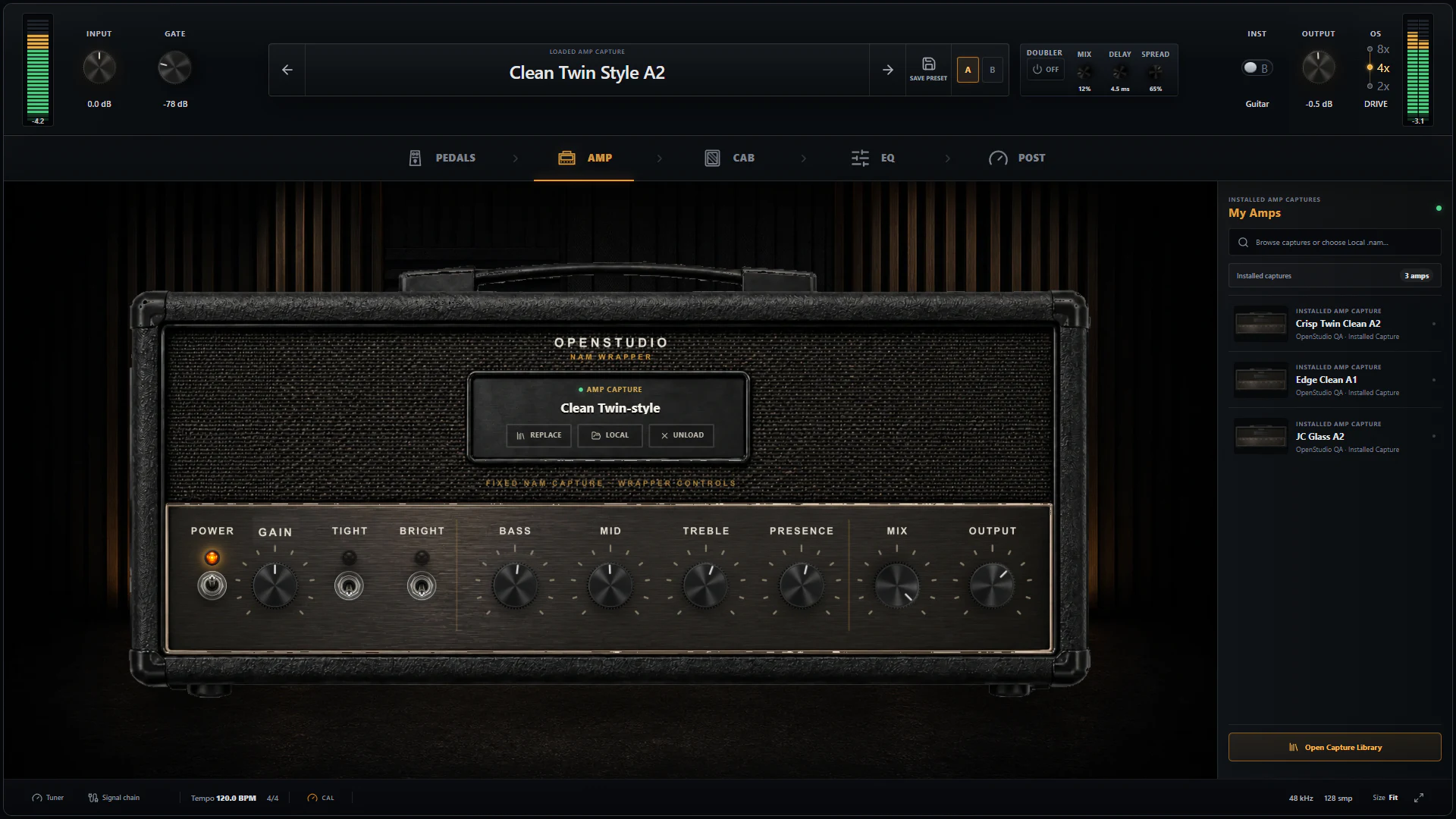
Add the rack and pick Guitar or Bass
- Click FX on the guitar track and add OpenStudio NAM Rack from the built-in effects list.
- Select the live instrument input on the track header and enable Monitor or arm the track.
- Choose Guitar or Bass.
- Set the interface gain once so it never clips, set input trim, and tune.
The profile is a voicing selector, not a preset. It changes only hidden tracking and frequency behaviour: EQ Boost band centres (120 Hz to 12 kHz for Guitar, 50 Hz to 10 kHz for Bass), Octaver tracking down to B0/E1, the drive stages' low-end handling, and the Graphic EQ's 65 Hz band, which becomes a low shelf. It never rewrites a visible control value or swaps a capture or IR.
The tuner observes the dry hardware input without joining the audible chain, so it adds no latency and needs neither record arm nor monitoring. It covers 27.5 to 1320 Hz, B0/E1 bass through upper guitar.
Several live NAM Rack tracks
Reviewed October 24, 2026 against app commit 1b5ba4b7. With at least two eligible audio tracks, OpenStudio automatically processes independent NAM Rack tracks across CPU cores. The helper count follows physical CPU cores minus one, capped at 127; the main audio callback also processes tracks. This is unreleased behavior.
An eligible track has only NAM Rack effects in its input and track FX chains, with no instrument, ARA, sends or sidechain connections. Tracks with other effects or routing keep their existing serial processing; independent NAM tracks can still use multiple cores in the same project. Each rack keeps its effect order and selected quality. The scheduler adds zero buffering samples; device and effect latency still apply.
Raw recording stays before FX and uses separate audio storage, so an unfinished NAM job does not stop its recording tap. Monitoring can still drop during an overload. Unrelated tracks on the serial path continue processing and routing. Live input also now mixes with incoming sends while transport is stopped, preserving both contributions.
Four armed and monitored NAM Rack tracks at 16 samples, and the 8-sample stretch target, are still not qualified as stable. Check your complete preset, captures, IRs and active pedals on your interface; extra cores do not guarantee that buffer size. If monitoring crackles or the rack reports Overload, open Audio Settings, using the rack's Buffer button when available, and follow the Audio setup guide. The development dialog distinguishes Active audio from Pending rate/buffer edits: choose Apply or OK, then confirm the active buffer before testing. Choose a buffer that stays reliable with every track enabled.
In the October 23 development checkout, Output peaks reduced recently means NAM Rack softened loud output peaks. Lower Output if you want less compression on loud notes. After three seconds without new activity, the message becomes neutral Earlier output peaks were reduced history. This is separate from Overload, which reports missed processing work, and from emergency safety muting. The full message wraps and is keyboard accessible.
Load a capture
A capture is either a local .nam file or a tone pack from TONE3000. Local loading never needs an account or a network connection. For a TONE3000 pack:
- Open the capture or IR library from its signal block, then choose Browse beside the T3K logo or Connect TONE3000. Signed-out users choose Continue in the community introduction. Sign in and select a tone in the default browser; its pack opens back in the rack.
- Search. Results are tone packs, each reporting how many captures it contains.
- Open View Captures on a pack to list its children with name, NAM architecture, and a topology badge.
- Select the exact child. Selecting only changes the pending choice; the rack still sounds the same.
- Click Audition to download that child and route it through your live input. Audition another to compare. Stop or Cancel restores everything loaded before, cabinet and mix values included.
- Click Use to commit it. The capture is recalled with the project.
Reviewed October 8, 2026 against OpenStudio development commit b482852; this is not a shipped-release claim. The library shows the official logo, signed-in avatar and username, creator avatars, artwork, format, and creator description. The account avatar uses initials when no image is available. A compact Browse button followed by the T3K logo stays in the responsive header, with Browse TONE3000 as its accessible name. Compact controls leave more height for the scrolling list; creator, license, instrument and character filters still apply to loaded results. In compact views, open Selected · details & actions for the selected tone and capture controls; loading captures opens it automatically. Narrow hosts let you scroll horizontally through all six library tabs. Favorites, Created, and Downloaded are online account collections; Installed, Local Favorites, and result stars remain local. Loaded tones retain source attribution and artwork when available. A real authenticated Select round trip and TONE3000 review remain release acceptance checks.
| Badge | What it means for your chain |
|---|---|
| RAW / AMP ONLY | Amp without a speaker. Load a cabinet IR in the Cab stage or it will sound fizzy and direct. |
| CAB EMBEDDED | A full rig with the cabinet already captured. The external Cab stage is bypassed automatically, and your chosen IR is kept for later. |
| PEDAL, PREAMP, STUDIO | Other topologies the browser labels. A pedal-only capture is not a complete tone by itself; it normally needs an amp or full-rig capture after it. |
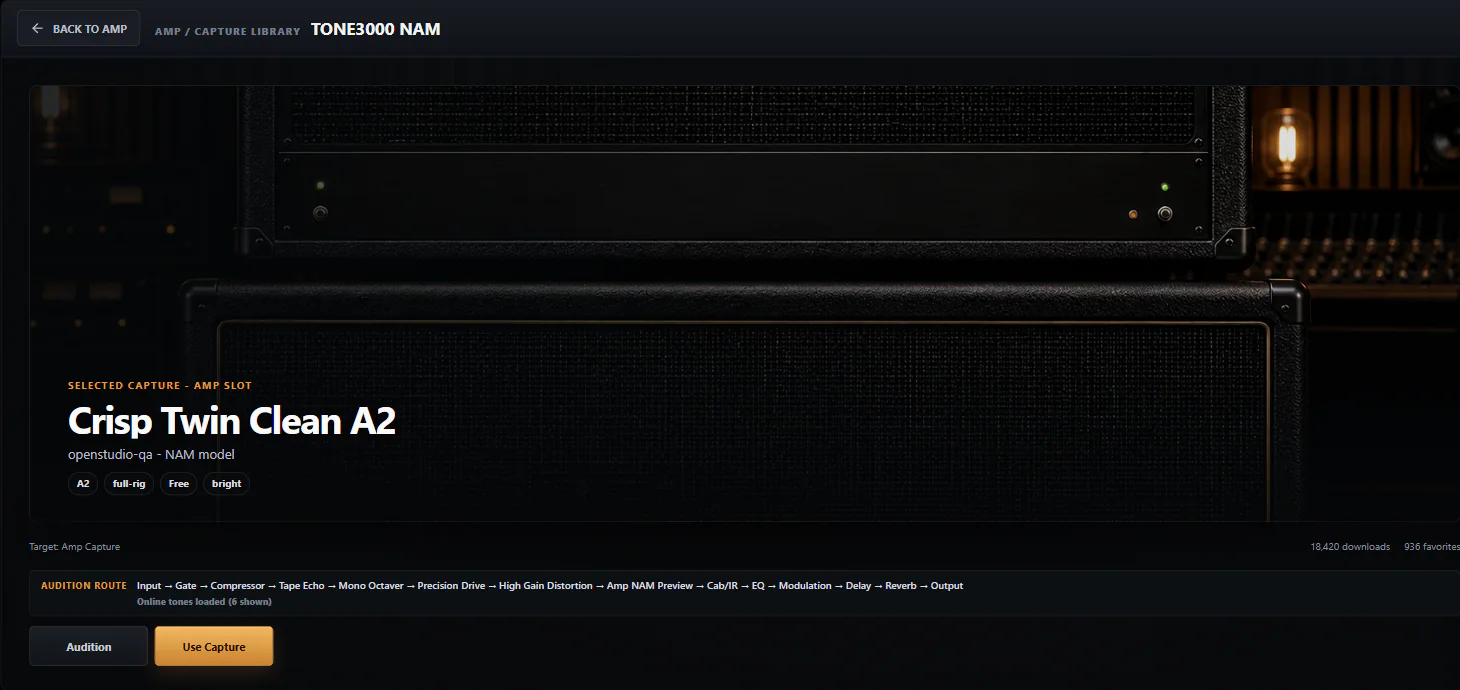
To replace a capture, reopen the selector and use another child. The Amp power control bypasses it without unloading; Unload clears the slot.
secret-tool, usually installed by the libsecret-tools package. Without it, sign-in fails; local .nam loading is unaffected.Whether the connected catalog is enabled in a public build depends on TONE3000's partner approval and the release configuration. Every build stays usable with local captures and IRs.
Cabinet IR and Cabinet Space
With an amp-only capture, the Cab stage convolves a WAV impulse response and shapes it with Level, HPF, LPF, Edge, Damp, Blend, Low Bloom, and a phase switch. Try several IRs before reaching for EQ. With a full-rig capture the external Cab stage is off automatically, since a second IR would double-filter the captured speaker.
Cabinet Space sits after the cabinet and before the post effects. Room (Amount, Width) adds an early-reflection field so the cab feels less close-miked. Doubler (Mix, Spread, Delay 3 to 20 ms) adds two drifting short-delay voices and only generates stereo from a mono source. Room needs a cab source; with an amp-only capture and the external Cab off, the UI reports No cab source. Check both in mono.
The pedalboard, before the amp
Everything on the Pedals page changes what reaches the capture, so it shapes the distortion itself, not just the final balance. The order is fixed:
Input trim -> Gate -> Compressor -> Octaver Fuzz
  -> EQ Boost (PRE EQ) -> Precision Drive -> Distortion
-> optional Pedal NAM capture -> Amp or Full-Rig NAM capture| Stage | Controls and use |
|---|---|
| Gate | Threshold and Release before gain raises the noise floor. Set Threshold during a noisy pause, then lower it until sustained notes end naturally. |
| Compressor | Comp, Attack, Release, Tone, an Intensity switch (8:1 or 16:1), parallel Mix, Level, and a detector HPF (Off, 80, or 240 Hz) so low strings do not pump the whole signal. |
| Octaver Fuzz | Down, Up and Direct blend the polyphonic stereo voices. Fuzz, Tone, Level and Vintage/Sustain/Gated Voice shape the independently switched fuzz stage. Direct is the unshifted voice; it also enters fuzz when Fuzz is on. Turn Clean beside Voice for a parallel contribution from the mixture entering Fuzz. Each stage can operate alone or together. |
| EQ Boost (PRE EQ) | Eight bands plus HPF/LPF before the gain stages. Cut lows here to stop palm mutes overwhelming a high-gain capture. |
| Precision Drive | A full-wet overdrive: Drive, Attack, Bright, Volume (default +9 dB), and its own gate. Low Drive with high Volume is the classic tightening boost. |
| Distortion | A separate gain voice with Heavy, Extreme, and Crunch ranges, Weight (Tight to Thick), Tone, Mix, Level, and a dedicated Dist Gate. |
| Pedal NAM | An optional captured pedal after the native pedals. Pedal Mix sets its dry/wet balance and acts as its bypass. |
At bright Tone settings, Sustain now retains a 15% low-frequency contribution. Sustain's fixed level makeup follows Fuzz and Tone, strongest around the centre of Tone and tapering to zero at both ends. All three wet voices share a headroom trim before Clean Blend; the clean contribution keeps its level. Voice levels still depend on the source material and Tone position, so adjust Level when comparing sounds, especially at the Tone extremes. Combining octave voices uses a headroom pad derived from the mix controls only in the fuzz clipping and sag path; the clean blend and gate detector keep their incoming level, and octave tracking stays before fuzz. In Bass mode, Gated has a longer detector release, separate opening/closing thresholds and a short hold before closing. Guitar keeps its previous gate behavior and sag timing. The same pedal controls select these behaviors.
Start with every pedal off, get the capture and cabinet right, then enable one stage at a time. The tone-building guide walks through a clean and a high-gain preset stage by stage.
The unreleased October 18 refinements make Fuzz follow the interface CAL reference used by the native drive stages, while preserving the raw Clean Blend contribution. Set CAL from your interface specification; use Input trim and pedal Level for creative gain. Guitar/Vintage also has a bounded internal coupling change, so earlier active development tones may sound different. Compare Fuzz alone, with Drive, with Distortion and with both through your chosen amp and cabinet at the same playback volume. Exact-file tone preference and two-track hardware performance remain unqualified; these changes are not an audition-approved sound or crackle fix.
The pedal's Clean knob supports drag, keyboard adjustment and Undo. Press Enter on the focused knob or right-click it for exact percentage entry; Escape cancels and double-click resets. While Fuzz is bypassed, the chosen blend is saved for when you engage it. Clean includes any active Direct, Down and Up voices. Level controls the whole blend before PRE EQ → Drive → Distortion → Pedal Capture → Amp, so raising Level drives those later stages harder. At 100% Clean and 0 dB Level, Fuzz passes its incoming mixture unchanged; the later gain stages still process it. The header's OS / DRIVE setting applies to Precision Drive and Distortion across all NAM Rack instances, not to Fuzz or NAM captures.
The October 23 development refinement reduces lower/mid Fuzz excitation in Vintage and Sustain while retaining their maximum-gain endpoint; Gated is unchanged. Moderate settings amplify less input noise but also give quieter late sustain. For a sustained, scooped sound in the direction of the Swollen Pickle reference, select Sustain and adjust through your amp and cabinet; OpenStudio is not a circuit replica or a matching-knob model. When stacking Fuzz, Drive and Distortion, use pedal Level to control excitation into the next stage. Set the rack Gate above the actual idle input noise, then adjust Release in Device Controls to preserve note endings. It detects the clean input and attenuates after the pedals/models, before cabinet and time effects. A threshold below the input noise leaves it open. No hidden gate is added; full-gain stacks can still amplify hiss strongly.
After the amp
After Cabinet Space the post section is reorderable: Graphic EQ, Modulator, Stereo Delay, and Reverb in the order you choose, then output trim, a safety guard, and the meters. A disabled Delay keeps its existing tail draining; changing its controls while off takes effect when you engage it again. The October 18 development optimizations skip unnecessary work only after the disabled Delay has no tail; hardware performance and tone still need qualification.
The Graphic EQ has nine bands at 65, 125, 250, and 500 Hz and 1, 2, 4, 8, and 16 kHz, plus or minus 12 dB each, an HPF (20 to 500 Hz), an LPF (3 to 20 kHz), and a Level trim. Double-click a filter to set it Off. The delay has time, feedback, mix, modulation, ducking, ping-pong, sync, and a Tape mode.
| Reverb voice | Macros shown on the panel |
|---|---|
| Studio | DECAY, TONE, AIR |
| Plate | DECAY, DAMP, SHIMMER |
| Hall | DECAY, DAMP, MOTION |
| Room | SIZE, TONE, EARLY |
Every voice also has Mix, Pre-delay, Low cut, and a default-off Pad texture. Decay runs 0.2 to 12 seconds; Room treats it as Size.
Presets, A/B, and recall
A rack preset (.ospreset) is the complete creative tone. The library supports notes, tags, folders, A/B, and export. For A/B, keep the untouched tone in A, edit in B, and match output level before deciding.
In the October 22 development checkout, Preset Library → Profile review lists presets whose instrument label disagrees with the saved Guitar/Bass profile. The collection is available in either instrument mode, and each affected row shows both values. Loading the original preserves its saved profile. If the label was intended, choose Create Bass copy… or Create Guitar copy… in the selected preset's details or its row's Actions menu; use Actions in compact windows. Review the explanation, choose a unique name, and confirm Create copy. The independent copy gets the chosen active profile and matching label while retaining the other saved settings. Profile changes affect voicing and EQ frequencies, so audition the result. The original and current rack remain unchanged; the copy is not loaded automatically. Select its instrument mode to find and load it later. Existing names are not overwritten, and failures appear in the library.
- Presets reference local NAM and IR files; they do not embed them. On another machine the rack offers Locate, Search in Folder, or TONE3000 re-download where the source metadata allows.
- Factory effect templates contain control settings only, no capture or IR; they shape whatever capture is already loaded.
- Device calibration (CAL) describes your interface and the capture's reference level. It does not travel inside a preset; the Input knob is the creative trim.
- The project stores the exact child capture, its source identity, and every rack parameter. If an asset is missing at load, the in-rack recovery card offers Locate, Replace, and Bypass.
Rendering with the mix
The rack is a built-in effect in the track's FX chain, so it prints through the normal offline render like any other insert, whether you render the master or the track as a stem. See Rendering & export. Record the DI dry and keep the rack on the track, so the tone can change later without replaying the part.